
Controller
Electra One mkI
If your controller is not responding or seems to be frozen after it was connected to the USB port, the firmware image is most likely corrupted.
To resolve that, shortly press the recessed Update button on the back panel:
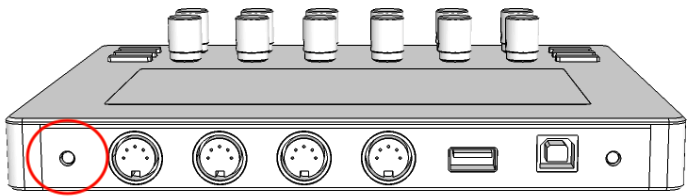
After the update button was pressed, click the "Force firmware update" button below. It sends firmware-v3.5.4.img - the firmware for this controller, never the mk2's.
Update from an image on your computer
If the controller starts and answers the app but its screen is blank or garbled - after the SD card was formatted or replaced, say - it is the interface files that are missing rather than the firmware. Factory reset writes those back.
Electra One mkII
To force firmware update on mkII controller, press and hold the right-bottom [MENU] button. While keeping the button pressed, reconnect the USB cable. The bootloader application will start on your controller.
Once in the bootloader mode, follow the instructions at Firmware update starting at step 4.
Electra One not connected.
The controller must be connected to read its system stats.
No controller is connected, so there is nothing to compare the app against.